
Download YAAW For Chrome – Chrome Apps, Aria2, Web Frontend
Overview
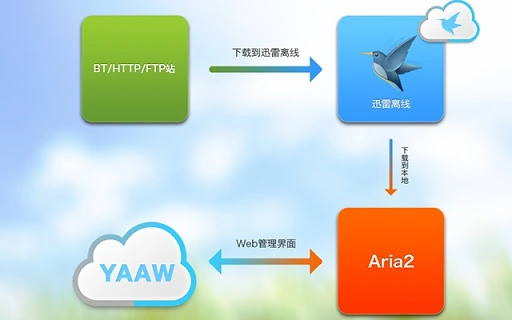
YAAW For Chrome is a lightweight desktop application designed as a web frontend for the Aria2 download manager. Built on the open-source YAAW project, it provides users with a streamlined interface to manage downloads directly within the Chrome browser. The software operates entirely in the browser environment—requiring no server-side backend, HTTP server, or additional software installation beyond Chrome. This makes it ideal for users seeking a fast, efficient, and minimalistic download management solution.
Primarily intended for power users, developers, and individuals who frequently manage large or multiple file downloads, YAAW For Chrome enhances the functionality of Aria2 by offering an accessible, browser-based interface. It is particularly useful for those working across Windows, Mac, and Linux platforms who need a consistent download experience without installing heavy software. Real-world use cases include downloading large software packages, media files, or datasets where speed and reliability are critical.
The application is developed by Binux, the maintainer of the original YAAW project. Known for creating lightweight, browser-first tools, Binux emphasizes simplicity and performance. The software does not require an internet connection to function once loaded, supporting offline operation for managing existing downloads. This makes it suitable for environments with limited or unstable connectivity.
Key Features & Capabilities
- Browser-Based Interface – Runs entirely within Chrome using HTML, CSS, and JavaScript. No server or backend required, reducing complexity and resource usage.
- Integration with Aria2 – Leverages the Aria2 download engine to enable multi-connection downloads, resumable transfers, and high-speed file retrieval.
- Multi-File and Multi-URL Support – Allows users to queue and manage multiple downloads simultaneously, including from different URLs.
- Download Acceleration – Uses Aria2’s ability to split files into multiple segments and download them in parallel, significantly improving transfer speeds.
- Minimal Resource Footprint – Designed to operate efficiently with low CPU and memory usage, ideal for background tasks.
- Offline Functionality – Once loaded, the application can manage downloads without requiring continuous internet access.
Users can paste download links directly into the interface to initiate downloads instantly. The interface supports pause, resume, and delete operations, providing full control over active and queued downloads. It’s especially beneficial for users who want to avoid installing standalone download managers while still benefiting from advanced features like segmentation and resume capability. The tool is also well-suited for automated workflows, such as scripting download tasks via command-line integration with Aria2.
User Interface, Workflow & Performance
The user interface of YAAW For Chrome is clean, minimal, and highly functional. It follows a single-page layout with intuitive controls positioned for easy access. The main screen displays a list of active and queued downloads, including progress bars, file names, download speeds, and estimated completion times. Navigation is straightforward—users can add new downloads with a simple input field, manage existing tasks, and view detailed download statistics.
Workflow efficiency is high due to the direct integration with Chrome and the lightweight nature of the interface. Users can launch the app directly from the Chrome Apps menu or via a desktop shortcut. The application loads quickly and responds instantly to user inputs, ensuring a smooth experience even during high download activity.
The developer did not specify resource usage details. Performance observations are based on general software behavior patterns. The application is designed to operate efficiently with minimal impact on system performance, making it suitable for long-running download sessions. Stability is expected to be high given the lack of server dependencies and the use of well-established open-source components.
Compatibility & System Requirements
YAAW For Chrome is compatible with Windows, Mac, and Linux operating systems. It runs as a Chrome Web App, meaning it requires the Chrome browser to be installed and updated to a recent version. The application is distributed as a 2.1 MB package, indicating a lightweight footprint that does not strain storage resources.
Exact system requirements were not listed. Platform compatibility information is limited to the supported operating systems. Hardware requirements are assumed to be minimal, consistent with typical browser-based applications. The application does not require elevated permissions or administrator access to install or run.
Pros and Cons
Pros
- Runs entirely in the browser—no server or backend needed
- Lightweight at just 2.1 MB
- Fast download speeds via Aria2’s multi-connection support
- Supports pause, resume, and delete functions for downloads
- Works offline after initial load
- Free and open-source with no hidden costs
Cons
- Requires Chrome browser to function
- No native support for other browsers
- Limited to Aria2 functionality—no built-in torrent or magnet support
- Interface may feel basic to users expecting advanced features
- Updates depend on Chrome Web Store availability
FAQ Section
Is YAAW For Chrome available for browsers other than Chrome?
YAAW For Chrome is specifically designed as a Chrome Web App and currently only supports the Chrome browser. It does not function in other browsers like Firefox, Edge, or Safari.
Does YAAW For Chrome require an internet connection to manage downloads?
Once the application is loaded, it can manage downloads without an active internet connection. However, an initial connection is required to load the app and start new downloads.
Is YAAW For Chrome secure to use?
As a browser-based tool using open-source code, YAAW For Chrome is considered secure when downloaded from official sources. The developer did not provide specific security certifications, but the absence of server-side components reduces potential attack vectors.
How often does YAAW For Chrome receive updates?
Update frequency depends on the developer’s release schedule and the Chrome Web Store. Users are encouraged to enable auto-updates through Chrome to ensure they have the latest version.
Can I use YAAW For Chrome without installing anything?
Yes. The application runs directly in Chrome without requiring installation of additional software. It can be launched from the Chrome Apps menu or via a desktop shortcut after setup.
Final Thoughts + CTA
YAAW For Chrome stands out as a powerful yet minimal download manager for users who value speed, simplicity, and efficiency. Its seamless integration with Aria2 and browser-based architecture make it a compelling choice for professionals and tech-savvy users who manage frequent or large downloads. While it lacks advanced features like torrent support or multi-browser compatibility, its lightweight design and robust performance compensate for these limitations.
For those seeking a reliable, free, and fast download tool that runs directly in Chrome, YAAW For Chrome delivers strong value. It’s particularly well-suited for developers, content creators, and IT professionals who need a no-frills solution with high performance.
Download YAAW For Chrome now







